
This document describes the supported workflow when a machine has two upload sources:
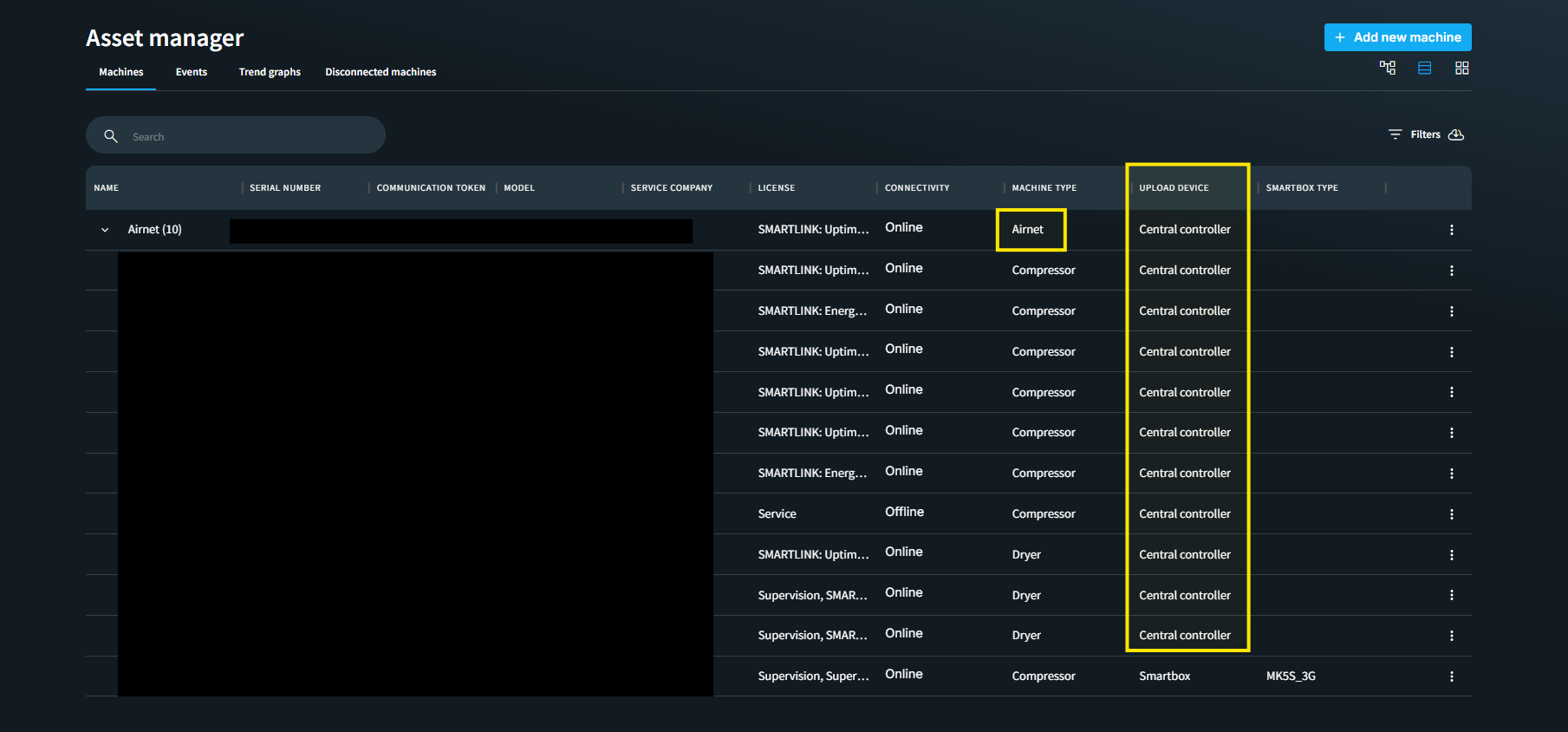
- Central Controller (Optimizer) uploading data centrally through the Airnet. In below screenshot an Airnet is uploading the data for the 10 connected compressors to it. The upload device is mentioned as Central Controller.
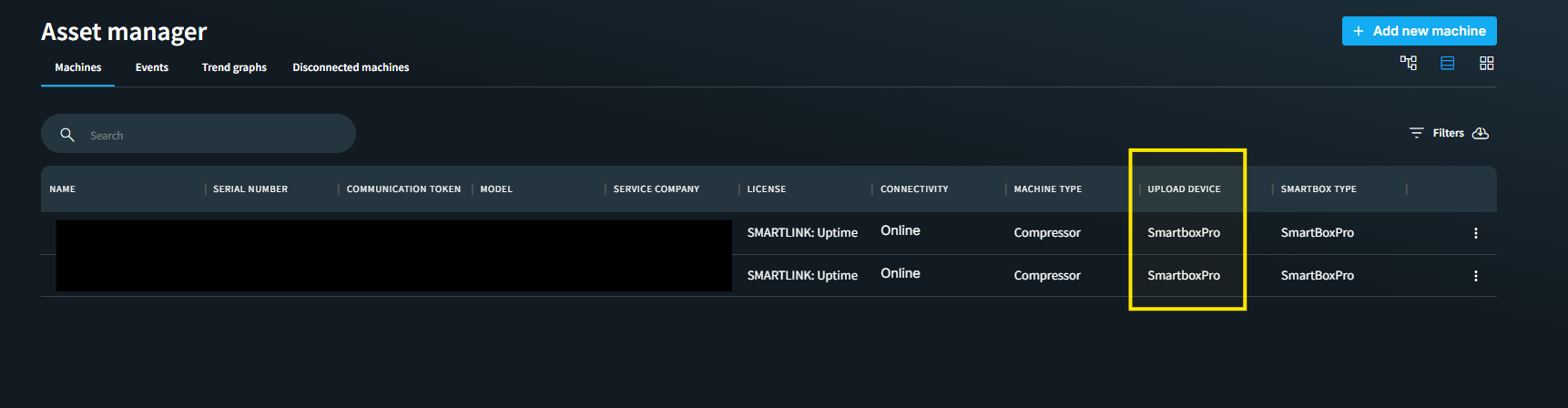
- Individual SmartBox/SmartBox Pro installed on the individual machines and uploading data independently. In below screenshot, 2 machines equipped with SBPs are uploadeding data individually.
A machine can be equipped with central controller and SBP as upload device simultaneoulsy. Usually the machine with SBP is under unassiged machines section. When the Central Controller becomes unavailable or goes offline, the machine can be switched to use data from the individual SmartBox/SmartBox Pro device. However, it is important to understand the data implications before making this change.
Scenario 1: Central Controller Goes Offline
Background:
The machine assigned to the site is typically the one linked to the Central Controller.
If the Central Controller goes offline due to hardware, connectivity, or other issues, users can continue monitoring the machine using data uploaded directly from the SmartBox/SmartBox Pro. If the machine doesn't have a SB/SBP installed previously, it can be installed on machine later. And after commissioning it'll show up under Tools --> Unassigned machines.
Steps:
- Navigate to the site where the machine is currently assigned through the Central Controller.
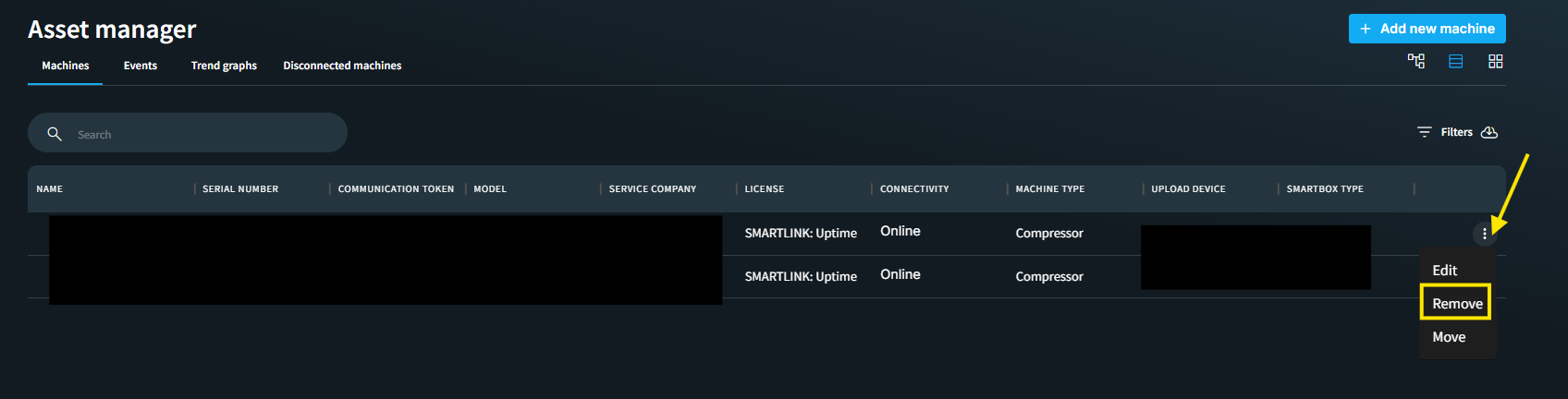
- Remove the machine associated with the Central Controller from the site. To remove the machine click on the three dots next to the machine and click on remove. The new window will show option to unassign and remove. Select remove to complete this step.
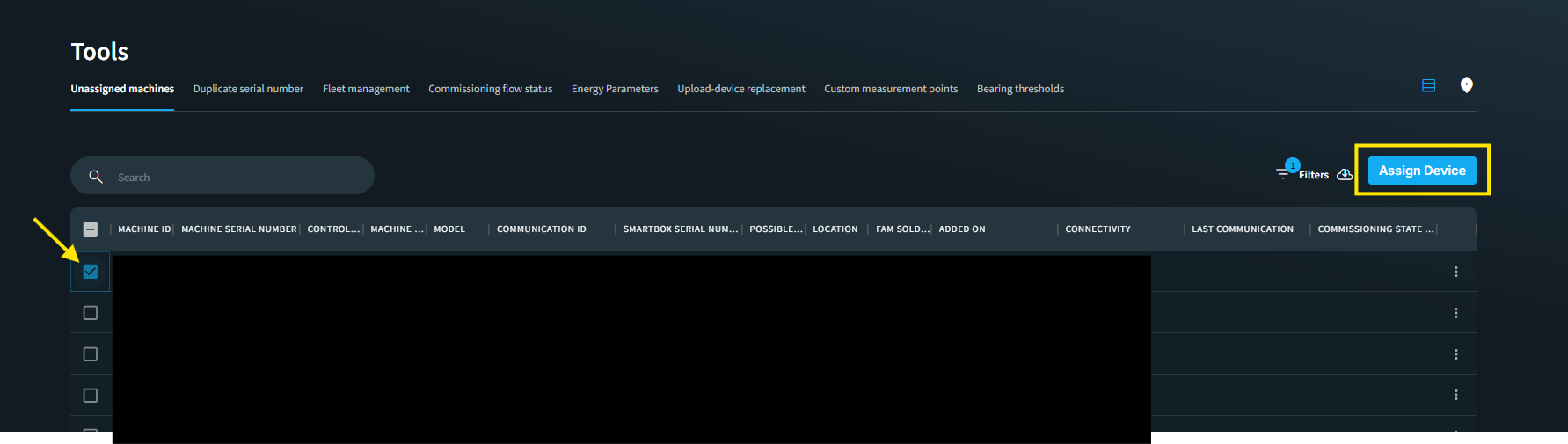
- Now locate the corresponding machine under Tools --> Unassigned Machines. This will be the machine uploading data through the SmartBox/SmartBox Pro. This machine should not be under removed machines section.
- Assign the SmartBox/SmartBox Pro machine to the site. After clicking on Assign Device, on a new screen select the site assocoated to complete this step.
- The original Central Controller machine will appear under Removed Machines.
Benefits
- Data collection continues without interruption.
- Smart Events generation becomes more accurate because data is collected directly from the machine at a more granular level.
- Monitoring and analytics remain available while the Central Controller is offline.
Important Consequences
⚠️ This change is not reversible without data loss.
When the SmartBox/SmartBox Pro machine is assigned:
- A new machine record is created under the site.
- Historical data from the original Central Controller (Optimizer) machine is not merged with the new machine.
- The two machine records are treated as separate entities.
If, at a later time, you want to remove the SmartBox/SmartBox Pro machine and want to reassign the original Central Controller machine, this will be not supported. The best scenario will be to delete the machine with central controller under the removed machines section. And then add it as a new machine under optimizer.
Recommendation
Before replacing an Optimizer-based machine with a SmartBox/SmartBox Pro machine, ensure that all stakeholders understand that:
- Historical data will not be merged.
- The operation cannot be simply undone.
- Returning to the original machine record will require starting data collection again from that machine's existing record.
Scenario 2: Central Controller Comes Online Again
Background
After a period of operating with the SmartBox/SmartBox Pro machine assigned to the site, the Central Controller may come back online.
In this situation, the system supports migration from SmartBox/SmartBox Pro back to the Central Controller (Optimizer) while preserving data continuity.
Steps
- Upload the Wizair Commissioning File on the site.
- This will merge the data from Smartbox/ Smartbox Pro to Central controller.
Result
The system will:
- Recreate the Optimizer machine under the site.
- Merge the data collected through the SmartBox/SmartBox Pro with the newly restored Optimizer machine.
- Maintain a continuous machine history after the merge.
Supported Direction
✅ Supported
SmartBox/SmartBox Pro → Central Controller (Optimizer)
- Data merge is supported.
- Historical records can be consolidated into the restored Optimizer machine.
Unsupported Direction
❌ Not Supported
Central Controller (Optimizer) → SmartBox/SmartBox Pro
- Data merge is not supported.
- A new machine record is created.
- Historical data remains separated between the two machine records.
Key Takeaway
When switching from an Optimizer-managed machine to a SmartBox/SmartBox Pro machine, the system creates a separate machine record and historical data cannot be merged later. However, when the Central Controller is restored and recommissioned using the Visual Commissioning File, the SmartBox/SmartBox Pro data can be merged back into the Optimizer machine.
Therefore, migration from SmartBox/SmartBox Pro to Optimizer is supported, whereas migration from Optimizer to SmartBox/SmartBox Pro is not supported from a data continuity perspective.